Routing Information Protocol Next Generation for IPv6
| Version 1 | Version 2 | Next Generation |
|---|---|---|
| RFC 1058 | RFC 4822 | RFC 2080 |
RIPng
- Supports multiple IPv6 addresses on each interface
- Protocol & Port: UDP,
521
Packet Frame
Figure 1: image not reproduced here (source: download.huawei.com).
Source: https://support.huawei.com/enterprise/en/doc/EDOC1100058403/b0f8860e/ripng-packet-format
the version field: set to 1
the command field:
1-Request: A request to send all or part of of routing table. ( specific / whole-table )
2-Response: A response containing all or part of routing table, this can be sent in response to a request or sent in unsolicited.
The maximum RTE(s) capbility of a packet: (depends on MTU size of the interface
               +   MTU - sizeof(IPv6_Headers) - UDP_Header_Len - RIPng_Header_Len   +
#RTE(s) =  INT | -----------------------------------------------------------------  |
               +                           RTE_size                                 +
Source: https://sites.google.com/site/amitsciscozone/ipv6/ripng
Route Table Entry Packet Detail
1. Next Hop RTE
It defines the IPv6 address of the next hop and is located before a group of IPv6-prefix RTEs that have the same next hop. The Metric field of a next hop RTE is always 0xFF.
Figure 2: image not reproduced here (source: download.huawei.com).
Source: https://support.huawei.com/enterprise/en/doc/EDOC1100058403/b0f8860e/ripng-packet-format
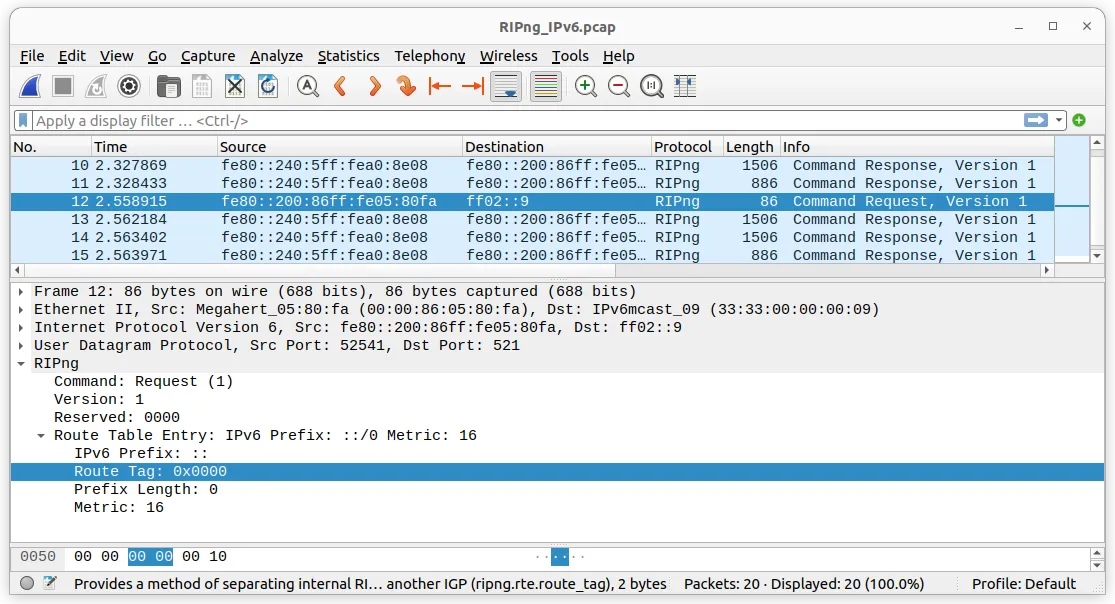
2. IPv6 Prefix RTE
It describes the destination IPv6 address and the cost in the RIPng routing table and is located after a next hop RTE. A next hop RTE can be followed by multiple different IPv6-prefix RTEs
Figure 4: image not reproduced here (source: download.huawei.com).
Source: https://support.huawei.com/enterprise/en/doc/EDOC1100058403/b0f8860e/ripng-packet-format
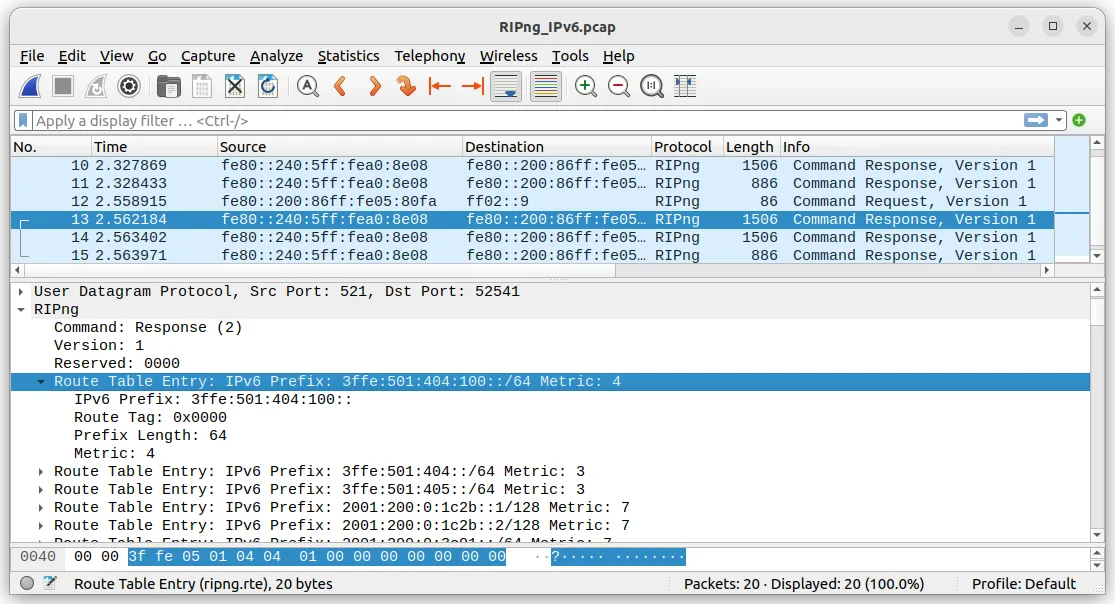
Timer / Intervals
All mentioned as default:
- Update Timer: 30 secs
- (Route) Timeout / Age Timer: 180 secs
- Garbage Collection Timeout Timer: 120 secs
- Hold-Down Timer: (NOT described in RFC 2080)
- mentioned in https://support.huawei.com/enterprise/en/doc/EDOC1100058403/c193f046/timers
- disable by default, if configured, hold-down timer starts after receives a route with cost greater than 16.
- mentioned in https://support.huawei.com/enterprise/en/doc/EDOC1100058403/c193f046/timers
Update Timer has a random offset within +/- 0 to 15 seconds,
the offset is derived from 0.5 * Update Timer
ref: https://docs.ruckuswireless.com/fastiron/08.0.40/fastiron-08040a-l3guide/GUID-97023AC1-C034-40EA-B02D-1E3E9DACCAC7.html
ref: https://techhub.hpe.com/eginfolib/networking/docs/switches/5130ei/5200-3943_l3-ip-rtng_cg/content/483570120.htm
ref: https://www.arubanetworks.com/techdocs/AOS-CX/AOSCX-CLI-Bank/cli_8400/Content/Chp_RIP/RIPng_cmds/tim-upd-rip-ipv-10.htm
Input Processing
Request Messages
- normally sent as
multicasts, can be unicast direct - no entry, then no response is given
- a whole-table request comes with
only/exactly1 entry as destination prefix of 0, a prefix length of 0, and a metric of infinity (16)- the response will include the
Split Horizon
- the response will include the
- a request for specific entries no
Split Horizonprocessing is done, due to these requests might be used for different purpose
Response Messages
- must be ignored if it is not from the RIPng port
- shold check the datagram is from a valid neighbor
- the source of the datagram must be
local-linkaddress (wiki),- and not one of the router’s own addresses
- (?) periodic advertisements must have their hop counts set to 255, and inbound, multicast packets sent from the RIPng port (i.e. periodic advertisement or triggered update packets) must be examined to ensure that the hop count is 255
- This absolutely guarantees that a packet is from a neighbor, because any intermediate node would have decremented the hop count
- (-) not yet confirm, but there is no data in the RIPng sample from wireshark
RTE Validation
- destination prefix validation
- not a multicast prefix and not a local-link prefix, a link-local address should never be present in a RTE
- prefix length validation (i.e., between 0 and 128, inclusive)
- metric validation (i.e., between 1 and 16, inclusive)
If the existing route is showing signs of timing out, it may be better to switch to an equally-good alternative route immediately, rather than waiting for the timeout to happen.
Therefore, if the new metric is the same as the old one, examine the timeout for the existing route.
If it is at least halfway to the expiration point, switch to the new route.
This heuristic is optional, but highly recommended.
Output Processing
Process be triggered:
- when a input request is received, the output response is only sent to the requestor via unicast
- by regular routing update, with the whole routing table
- by triggered updates, whenever the metric for a router is changed
Multicast to all neighbors comes with the multicast group FF02::9
Triggered Updates
- After a triggered update is sent, a timer should be set for a random interval between 1 and 5 seconds
- triggered updates should only includes those routers which have changed
- If input processing is allowed while output is being generated, appropriate interlocking must be done. The route change flags should not be changed as a result of processing input while a triggered update message is being generated.
Generating Response Messages
-
IPv6 source address must be
link-localaddress, except when replying a unicast Request Message from a port other than the RIPng portthe source address is put into routing tables (as the next hop) in the routers which receive this Response
-
the router must only originate a single Response message with a source address of the designated link-local address for a given interface
-
The choice of which link-local address to use should only change when the current choice is no longer valid. This is necessary because nodes receiving Response messages use the source address to identify the sender
If multiple packets from the same router contain different source addresses, nodes will assume they come from different routers, leading to undesirable behavior.
Split Horizon
wiki: https://en.wikipedia.org/wiki/Split_horizon_route_advertisement
Split Horizon is a algorithm for avoiding problems caused by including routes in updates sent to the gateway from which they were learned
Basic
- The basic split horizon algorithm omits routes learned from one neighbor in updates sent to that neighbor.
Poison Reverse
Often used within distance-vector routing, it set the route information to infinity instead of perform the age timer timeout
accelerate the route convergence(收斂)
ref: https://bethepacketsite.wordpress.com/2016/04/22/ripv2-split-horizon-and-poisoned-reverse/
Difference Between RIPv2
Figure 6: image not reproduced here (source: oreilly.com).

Source: https://www.oreilly.com/library/view/ccnp-routing-and/9780133149883/ch03lev3sec22.html
Basically, there are no large gap between RIPv2 & RIPng
ref: https://en.wikipedia.org/wiki/Routing_Information_Protocol
ref: https://www.rfc-editor.org/rfc/rfc2080.html
ref: https://blog.csdn.net/zjy123078_zjy/article/details/102584527